Reset Your GFiber Password or Find Your Account Email
Forgot your GFiber password? Reset your GFiber account password, recover your Google Account sign-in, or find your login email address to get back online fast.
Reset Your GFiber Account Password
If you sign in with an email address and a dedicated GFiber password, follow these steps.
- Go to the GFiber sign-in page.
- Click the Forgot password? link.
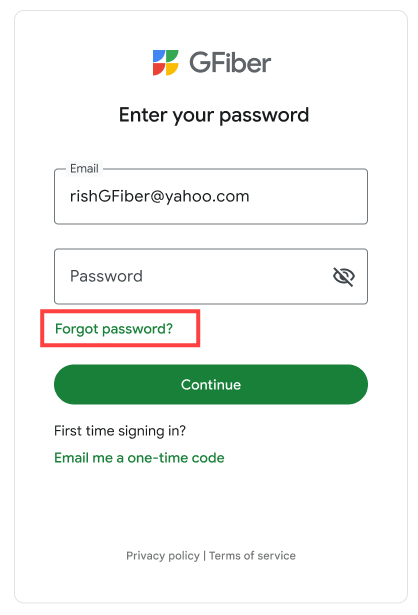
- Enter the email address you used to sign up for your GFiber, then select the Continue button. You'll see a Check your email screen.
- Open the email from GFiber and click the reset link.
- On the Set your password screen, enter your new password.
- Click the Submit button.

Want to skip passwords next time? You can sign in securely using your face, fingerprint, or screen lock. Learn how to set up and use passkeys for your GFiber account.
Reset Your Google Account Password
If you select Sign in with Google or use your Gmail password to access GFiber, Google manages your sign-in details.
To reset your password:
- Visit the Google Account recovery page.
- If you need help, review Google's tips for completing account recovery.
Find Your GFiber Account Email Address
If you don't remember the email address you used to sign up for GFiber, you can find it by verifying your street address.
- Go to the GFiber sign-in page.
- Click the Forgot email? link.
- Enter your full address in the Your street address field.
- Click the Continue button.
- Check your email inbox for a message from GFiber with your login email address.
Address not working? Enter the address exactly as it appears on your billing statement. If the address isn’t recognized, check for typos and try again.
FAQs
This message appears when the email address is incomplete or missing a character, such as @ or .com.
- Double-check that you have entered your full email address correctly.
It may take a few minutes for the email to arrive.
- Check your Spam or Promotions folders.
- For detailed steps on how to find missing messages, read our guide on how to get important emails from GFiber.
- Confirm you entered the email address associated with your GFiber account. If it doesn't match our records, we can't send the email.
- On the GFiber sign-in page, select the Resend email if you still don't see it.
If the email address linked to your GFiber account is no longer accessible, contact us to update your contact information.